How to Use CapacityTester
This guide will help you use CapacityTester for Windows 11 to determine if a USB storage drive is counterfeit.
What is CapacityTester?
Section titled “What is CapacityTester?”CapacityTester by c0xc tests whether a USB storage/flash drive is genuine, such as a 32GB SD card with a reported capacity of 2TB. If one were to go above the actual limit of 32GB, everything beyond that will be lost.
Downloading and Running CapacityTester
Section titled “Downloading and Running CapacityTester”-
You can download the Windows version of CapacityTester from its GitHub repository.
-
Once you have installed
capacity-tester.exe, run the executable as an administrator. The program will not work otherwise.
Using CapacityTester
Section titled “Using CapacityTester”WarningAvoid using CapacityTester on storage devices with existing, irreplaceable data, as the Volume Test will overwrite and format the target drive. Otherwise, we recommend using CrystalDiskInfo, to assess the device’s S.M.A.R.T data.
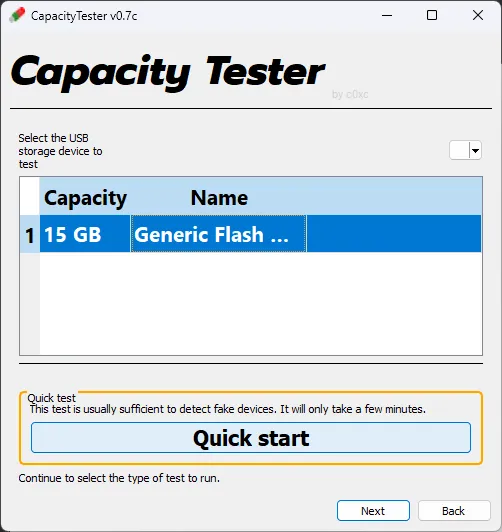
- Select the storage drive from the list below, and then click
Quick start.
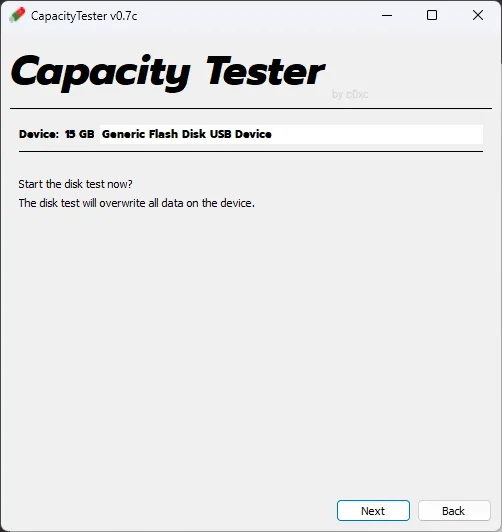
- The next page will warn you that the targeted drive will be wiped and formatted. Once you have ensured that you selected the correct drive, click
Next.
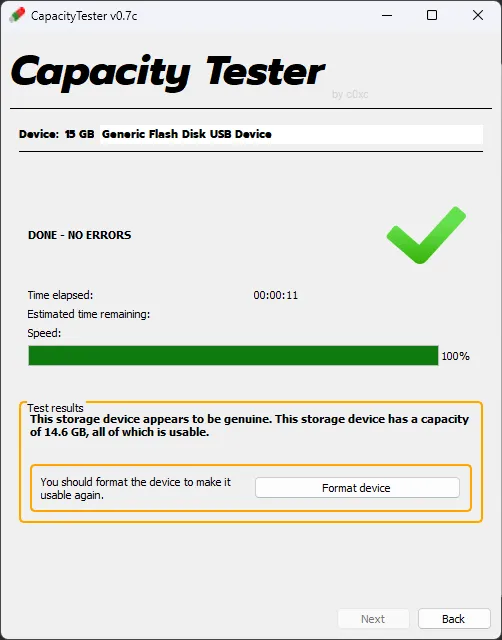
- Once the volume test has finished, it will return whether or not the drives reported capacity can be fully utilized. If the test did not pass, you most likely have a counterfeit or faulty drive.